The load lives in ten places.
The request is in email, the carrier is on WhatsApp, the price is in an Excel file, and the status is in someone's head.
Danube TMS · For freight forwarders and carriers
Turn transport into performance. The request from email, the AI agents, the exchanges, the signed order, the fleet and the invoice stay on the same load, from the first request to the money in the bank.
Why Danube TMS
The request is in email, the carrier is on WhatsApp, the price is in an Excel file, and the status is in someone's head.
Real requests, invoices, CVs and truck offers arrive mixed together. Someone sorts them by hand, and some slip through.
Every extra shipment brings more copying, retyping and chasing documents, so every step of growth asks for a new hire.
One road, start to finish
Every stage has its place in the platform, and nothing gets lost between them.
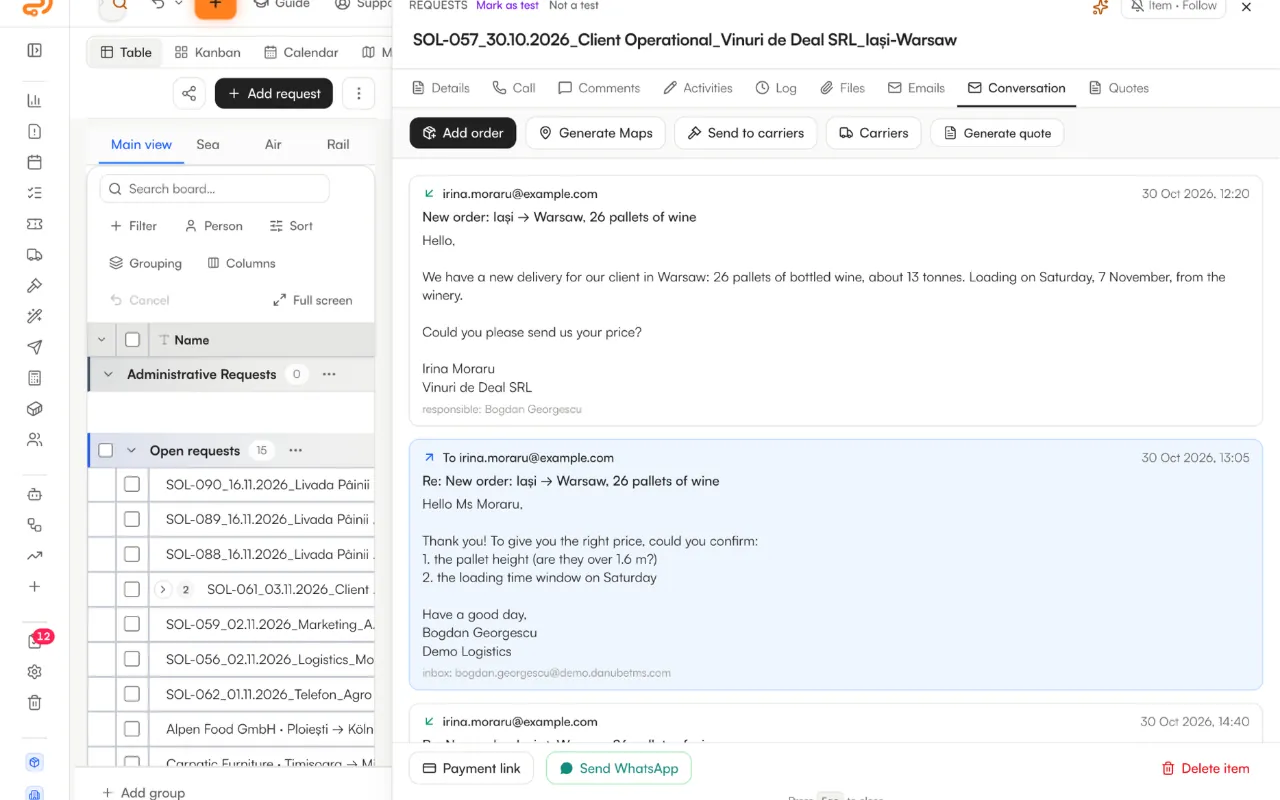
The client's email becomes a request on the board, with the route, cargo and attachments filled in.
AI agents sort the inbox and leave the team only the real transport requests.
The load goes out on every exchange from one screen, and the messages come back to the same place.
The client's and the carrier's orders, sent for online signature from the load's row.
Your own fleet and drivers, with every document and its expiry date.
The invoice from the order, the CMR from the carrier, and overdue payments in sight.
Follow-ups go out on their own, and inactive clients are brought back with email sequences.
Inside the platform
No mock-ups: these are screens from Danube TMS, filled with sample data. Pick a stage and see where it happens.
Every request sits on one board, grouped by stage, with its owner, its response time and its source.
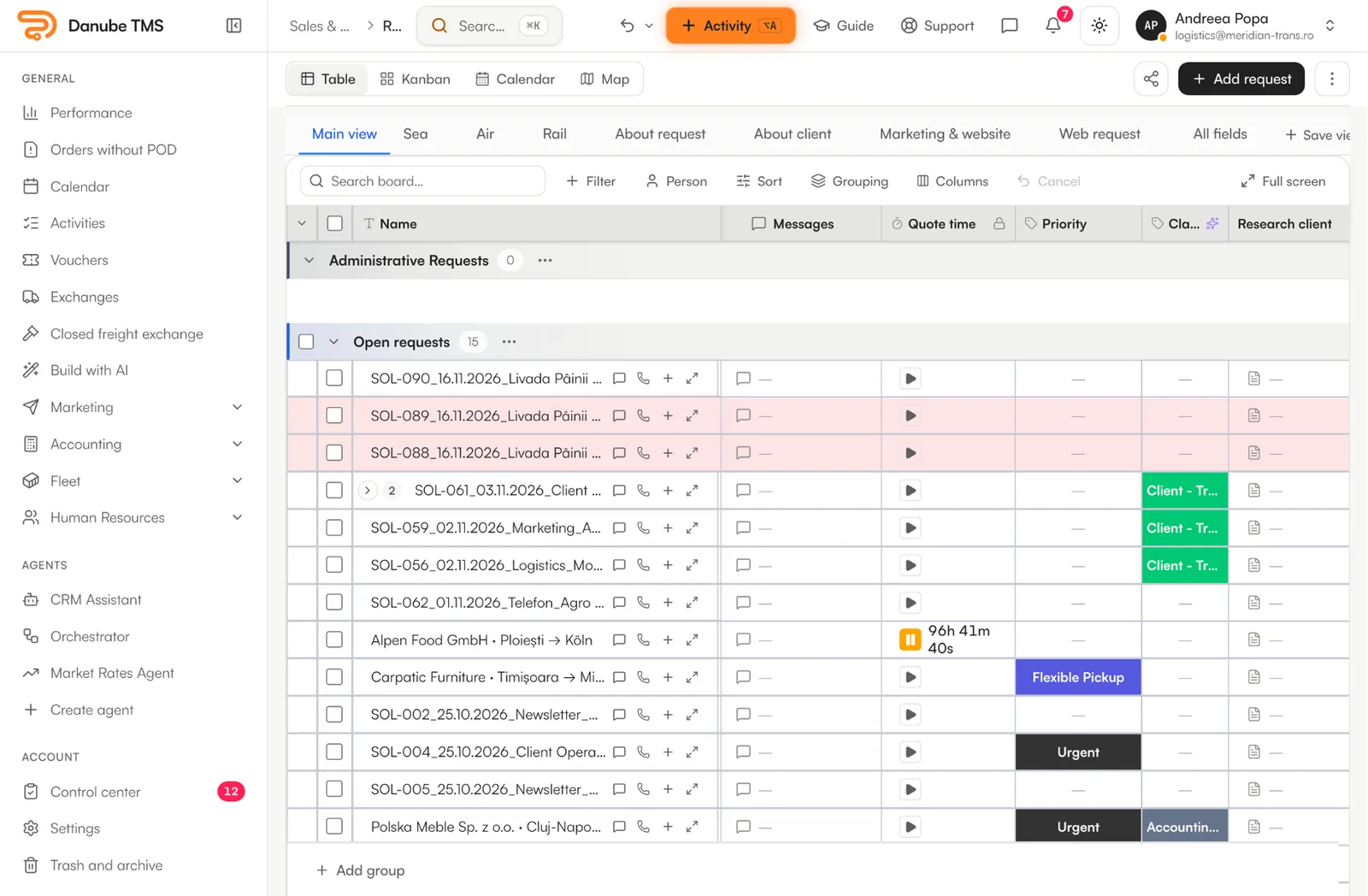
Screens are from the platform, with sample data.
What sets Danube TMS apart
Each one runs on the same load, from the first request to the money in the bank.
AI fills in the route, the cargo and the client from the email. Replies in the same thread join the existing request, with no duplicates.
Invoices, CVs and truck offers are set apart from the real requests, so the team works only on transport.
A new conversation on your company number lands on the board as a request, and you reply from Danube.
From the request, AI writes the offer for the client and puts it in a PDF, ready to send.
The pricing engine prices the client and the carrier from the loads you have already run on that route.
Post, edit, repost and delete a load once, on TimoCom, Trans.eu, BursaTransport, 123cargo and Cargopedia.
Upload the client's order as a PDF or a photo, and AI fills in the load: route, dates, cargo and price.
Follow-ups go out from the responsible colleague's inbox and stop by themselves when the client replies.
The company fills itself in from ANAF and gets a financial rating from 0 to 10. The decision to work with it is automatic, or the manager’s.
The carrier uploads the CMR, the invoice and the POD through a link, with automatic reminders until they do.
Invoices overdue for more than 120 days are flagged for litigation. The case, the payment notices and the formal demand are handled from the same panel.
Your company's court cases from portal.just.ro sit next to litigation, with their hearing dates, refreshed in one click.
Download the month's invoices and documents for your accountant in one export, plus the month's accounting note: bank, cash, payroll, fixed assets and every other register in a single Excel.
Profit and loss, cashflow and VAT, calculated from loads and invoices, without exporting to Excel.
What each colleague costs, set against the profit their loads bring in.
What changes for you
The pricing engine prices a load for the client and for the carrier from your own history on that route. Paste an Excel table or an email with several routes and AI fills in the price without VAT and the transit days; suspicious rows are flagged, and prices are never invented.
Priced in a minute, with the carrier cost kept out of what the client sees.
Create the load from the request, or with “Fill in with AI” from the email or document you received. From its row you generate both orders, send them for online signature and issue the invoice through SmartBill.
ITP, RCA, CASCO, CMR insurance, vignette and licence; for drivers the licence, CPC, tachograph card, ADR and the A1 form. Alerts at 30, 15 and 7 days. On delivery, the carrier gets a link to upload the CMR, the invoice and the signed order, with automatic reminders.
Profit is calculated on every row, with sub-orders and discounts. “To collect” shows what is overdue, with a payment reminder or litigation in one click. P&L, cashflow and VAT reports come from the same data.
31%
Win rate on quotes
€627
Avg. margin / load
248
Loads this month
17
Invoices unpaid
Platform
Danube works with the mailboxes, the exchanges, the invoicing software and the bank you have now. Your team doesn't change how it works; you just remove the copying between them.
Which capabilities come with each plan is laid out on the pricing page. See what each plan includes
AI in Danube
An assistant on every page, boards and dashboards built from a sentence, documents read for you. On Danube CRM, every plan comes with AI credits.
Ask anything about the page you’re on (what it does, where to click, how a flow works) and get an answer in your language.
Describe a feature in a few sentences. AI creates the boards, columns, automations, email sequences and dashboard for it.
Write what you want to see, like “profit per client this quarter”, and the widget is built from your board data.
Invoices, bank statements, orders: AI reads them, extracts the data and proposes where it belongs.
Emails to a shared inbox like office@ or to a colleague’s Gmail, Outlook or IMAP mailbox become requests on the board: details filled in, attachments saved on the request and, if they are documents, read by AI.
Texts and emails translated for clients and partners who work in another language.
On a new request, an agent fills in the board’s columns and, if details are missing, drafts the reply asking for them: saved as a draft, never sent on its own. On WhatsApp, it sorts new conversations and sums them up.
Company details from public registers, completed by AI, so a new lead arrives with context and a score.
Chrome extension for freight exchanges
Freightbot runs in Chrome, on your team’s exchange accounts. You turn the extension on and choose what it does on each exchange.
Danube FreightbotClick the client price to change it
Ctrl+Mopens the route
Tutorials
Press “Guide” and the page explains itself: what it does, where to click, in order. Prefer to watch? Play it as a video.
First steps
Security
Stored in the EU, encrypted end to end, and walled off from every other company in the database itself.
Your company’s data is stored in the European Union, in Ireland (AWS region eu-west-1).
Every connection (browser, app, database) goes over TLS (HTTPS). Nothing travels in clear text.
The database, its backups and your files are encrypted on disk with AES-256.
Every record belongs to an organization, and Row Level Security in the database refuses anything else: the rule is enforced by the database, not just by the screens.
SmartBill, Billingo, Stripe and WhatsApp keys and email passwords are stored encrypted in Supabase Vault, never as plain text in a table.
Sign in with Google or with email and password, and turn on two-step verification with an authenticator app (TOTP). On Enterprise, colleagues can sign in through your company’s identity provider with SAML SSO (Microsoft Entra ID, Google Workspace, Okta).
Questions
TimoCom, Trans.eu, BursaTransport, 123cargo and Cargopedia, on the Growth and Enterprise plans. Your loads sit in one table: you post, edit, repost and delete them once, on every exchange you choose. The Danube Freightbot Chrome extension brings the exchange messages into the same place.
It prices road transport for both client and carrier from your own history on the route, not from a generic table, so the more you quote, the sharper it gets. It's part of the Enterprise plan.
Every email goes through a chain of agents: the first one classifies it (transport request, accounting, CV, carrier offer or spam), the second checks that the sender really needs transport, the third gives the final verdict. You can add your own agents and test them on recent emails before switching them on. If AI does not answer, the email still becomes a request: no client is lost.
Yes. Client invoices are issued straight from the order through SmartBill or Billingo, with the due date calculated, and supplier invoices are read by AI and compared with the amount on the order. e-Factura is fetched from ANAF SPV and checked. Accounting and invoicing come in on the Growth plan.
The client gets a link, reads the order and the terms, ticks the clauses and signs. The opening, the signature and the IP address stay in the history. The carrier gets a link to upload the CMR, the invoice and the signed order. Order sending and signature collection are part of the Growth and Enterprise plans.
Yes. Import your carrier and client lists from Excel or CSV with column mapping. The preset boards (clients, carriers, fleet, requests, orders, leads) are ready from day one on every plan.
Yes. Connect your company's WhatsApp Business number (a step-by-step setup walks you through it) and a new conversation becomes a request on the board you choose, assigned in rotation. You reply from the request: free text within 24 hours of the client's last message, an approved template after that. On Enterprise, an AI agent can sort new conversations and send an automatic first reply.
Beyond the default
When your process needs something off the standard path, we build it: custom boards, custom automations, custom integrations.
Talk about a custom build15 minutes, on your real lanes, no slides. We show you where your desk gets faster.